
Sound Recognition
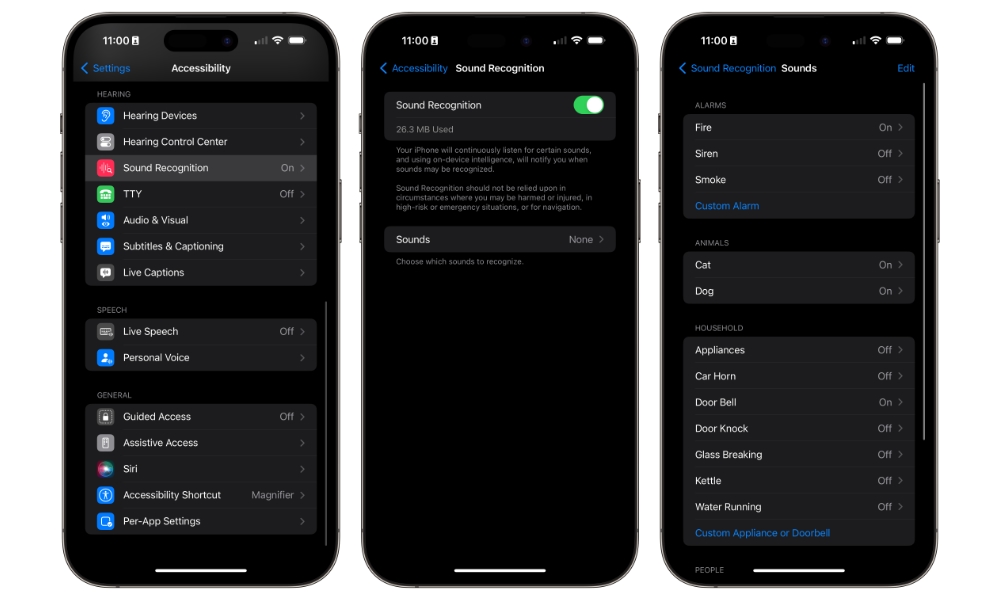
Sound Recognition is a quiet safety feature that can also be a practical everyday tool. Your iPhone can listen for certain sounds, such as alarms, doorbells, smoke alarms, sirens, baby cries, and more, then alert you when it detects them.
It can also be trained to recognize custom sounds like a specific appliance beep or even alert you when someone is calling your name. This is helpful if you’re wearing headphones or simply tend to miss audio cues.
Even if you’re not using it for safety alerts, Sound Recognition can be useful in small ways. If you’re focused on work and want a reminder that the doorbell rang, or you have a loud environment and don’t trust yourself to notice the oven timer, this adds a layer of awareness.
- Open the Settings app.
- Scroll down and go to Accessibility.
- Scroll down and under Hearing, tap on Sound & Name Recognition.
- Tap on Sound Recognition.
- Turn on Sound Recognition.
- Tap on Sounds.
- Choose the sounds you want your iPhone to detect. You can also choose Custom Alarm or Custom Doorbell to train it to recognize a unique sound.
Your iPhone will begin downloading all the sounds you chose. This is because your iPhone does the sound recognition in-device. This is so you can rest assured that Apple isn’t recording you while using this feature.
Pro Tip: To add your name, to Sound & Name Recognition (step 3 above) and select Name Recognition > Set up Name Recognition. Follow the instructions to teach your iPhone to recognize your name.