
Turn On Optimized Battery Charging and Charge Limit If You Have It
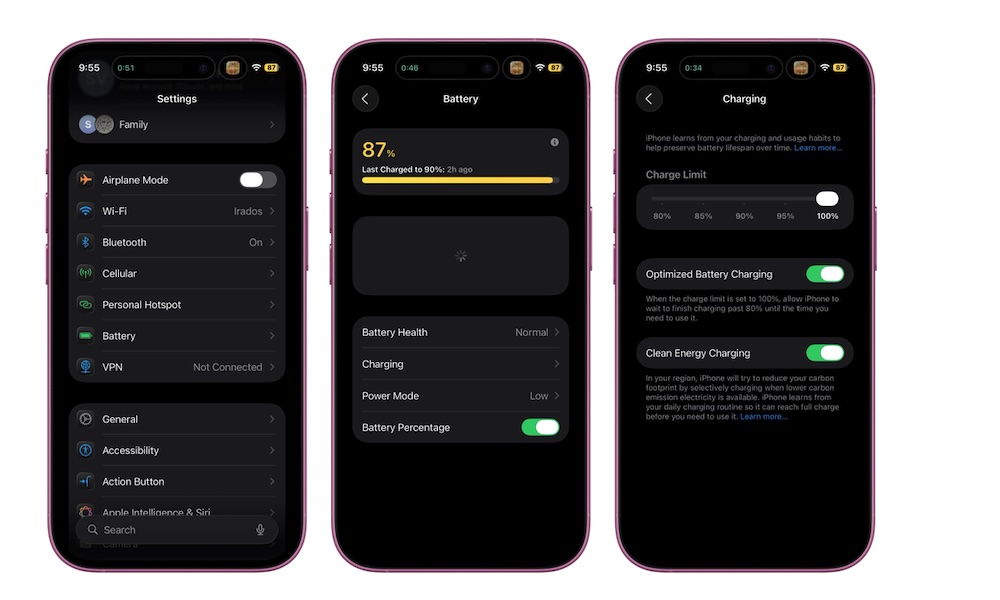
Battery health isn’t only about how old your phone is; it’s also about how you charge it. Keeping a battery at 100 percent for long periods can contribute to wear over time, which is why Apple’s charging optimizations are worth using.
In Settings > Battery > Charging, turn on Optimized Battery Charging. This feature lets your iPhone learn your charging patterns so it slows down charging times, only topping it up to 100% in time for you to unplug it.
If you have an iPhone 15 or newer model, you’ll also see a Charge Limit option here that lets you cap charging at a certain percentage. This is a great way to slow battery aging if your iPhone supports it, especially if you keep your phone plugged in for long periods and don’t have a consistent enough schedule to rely on Optimized Battery Charging.