
Offload Unused Apps
Deleting apps can feel like a commitment, especially if you feel like you might use them again sometime in the future.
This is why Offload Unused Apps is such a handy iPhone feature. This frees up storage by removing apps you haven’t used recently while keeping the documents and data. That means if you reinstall later, you’re not starting over from scratch.
This is perfect for older iPhones because you can reclaim space without worrying about which apps you might need someday. If you’re someone who downloads an app for a trip, a project, or a one-time task, offloading keeps your phone cleaner automatically.
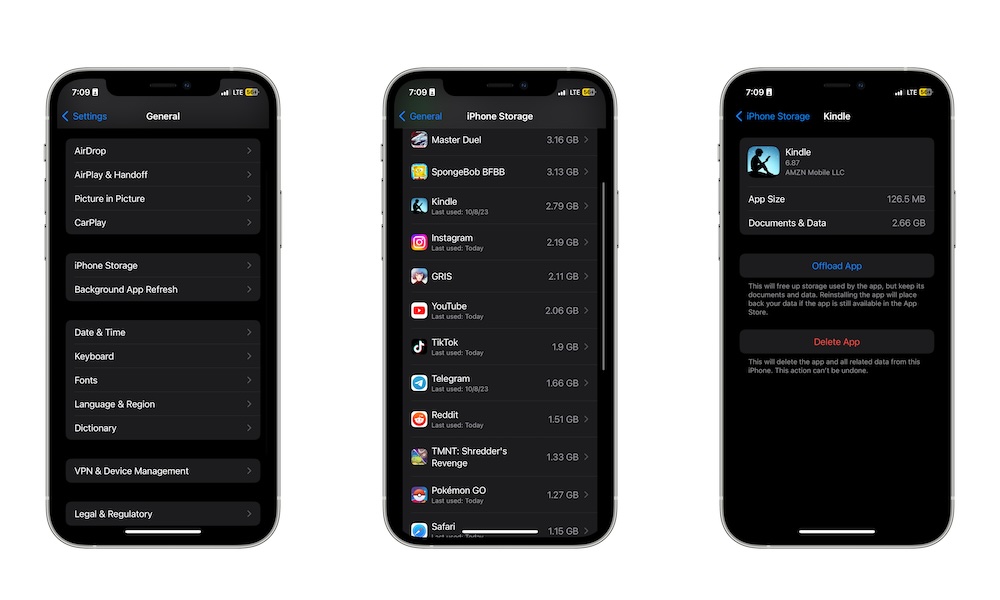
To offload apps, go to Settings > General > iPhone Storage, then scroll down and tap on any app you don’t need right now. Lastly, tap on Offload app, and your iPhone will take care of the rest.
You’ll still see the icons for offloaded apps on your Home Screen or App Library, but they won’t be taking up space. Instead, you’ll see a small download symbol to indicate their status; just tap that and the app will reinstall when needed.