
Try Resetting Your iPhone (if You Want an Extreme Solution)
Sometimes an older iPhone feels old because of too many things at once. If that’s the case, nothing will give you that feeling of a brand new iPhone more than starting from scratch.
You can erase all your iPhone’s content and settings, which is basically a factory reset, and set it up from the get-go. Of course, this means all your data will be deleted, so make sure to back up your iPhone before you try this. You can do it by going to Settings > Apple Account (Apple ID) > iCloud > iCloud Backup, and tap on Backup Now.
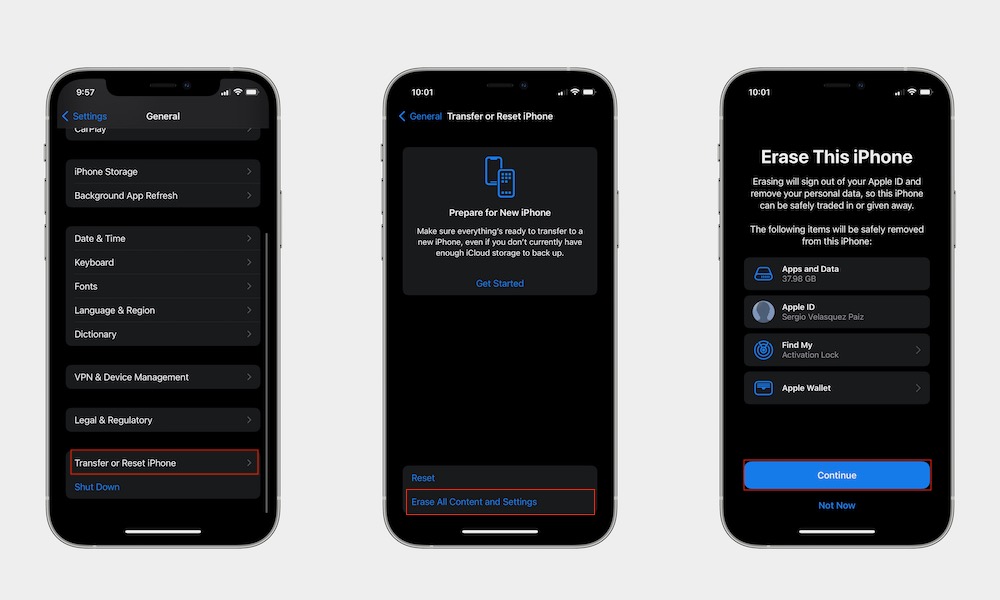
After that’s done, you can factory reset your iPhone by going to Settings > General > Transfer or Reset iPhone. From there, tap on Erase All Content and Settings, and follow the instructions on your screen.
This means that your iPhone will go back to its default settings, so if you want to follow this step, we recommend you try it first and then tweak the other settings on this list, so you don’t have to do everything twice.