
Adjust the Trackpad So Your MacBook Feels Right
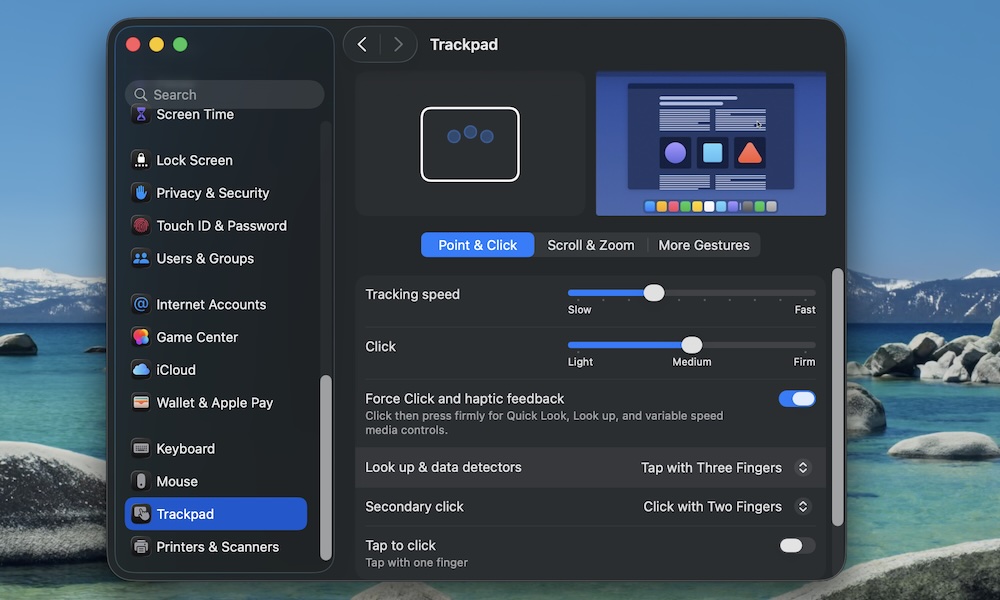
The MacBook’s Trackpad is great out of the box, but it might be a little slow for some people. Luckily, you can adjust your trackpad so it feels and works however you want. Here’s how:
- Click the Apple menu (Apple logo) in the top left corner of your screen.
- Go to System Settings.
- On the left sidebar, scroll down to the bottom and click on Trackpad.
From here, you can customize things like your Tracking speed or how hard you need to click for it to work. You can also click the Scroll & Zoom or More Gestures tabs near the top to customize your experience further.
There’s no right answer, so play with the settings until you find something that works for you.