
Change the Window Minimize Effect to Scale
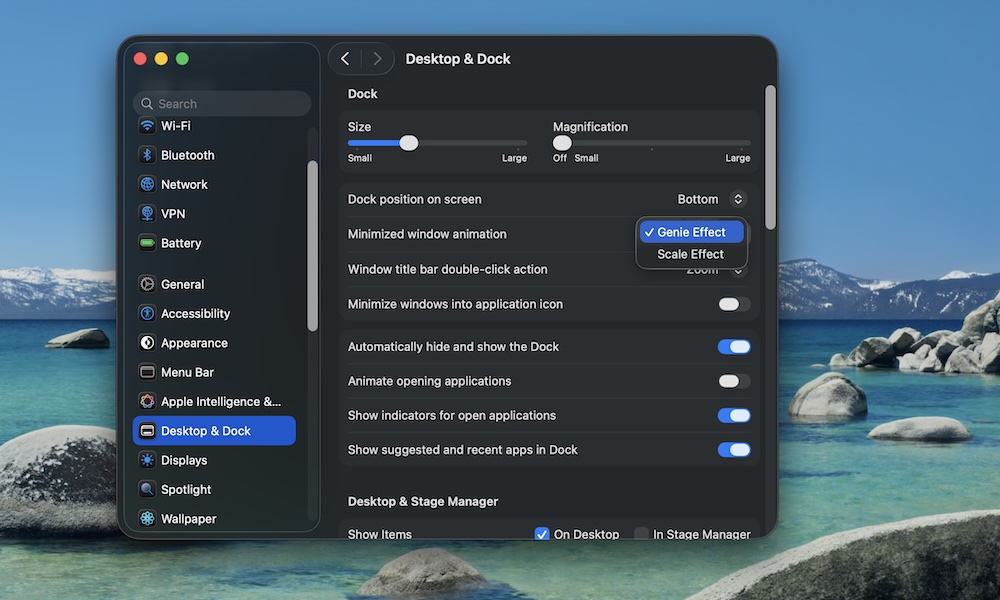
By default, your windows will minimize and open with a “Genie effect,” a cool transition that makes your windows swoosh back to the Dock.
The Genie effect is fun, but it’s also one of those little UI details that can make your Mac feel slower than it is, especially if you minimize and restore windows constantly.
Switching to the Scale effect makes minimizing windows feel a bit quicker. It’s subtle, but if you’re looking to make your Mac feel snappy, this change might do the trick:
- Click on the Apple menu (the button with the Apple logo) in the top left corner of your screen.
- Go to System Settings.
- Click on Desktop & Dock.
- Click the dropdown menu next to Minimize window animation.
- Select Scale Effect.
Combine this with Reduce Motion and minimizing windows will start to feel almost instant. Sure, it doesn’t feel as magical as before, but it might be a bit more practical over time.