
Use Apple Calendar to Never Be Late Again
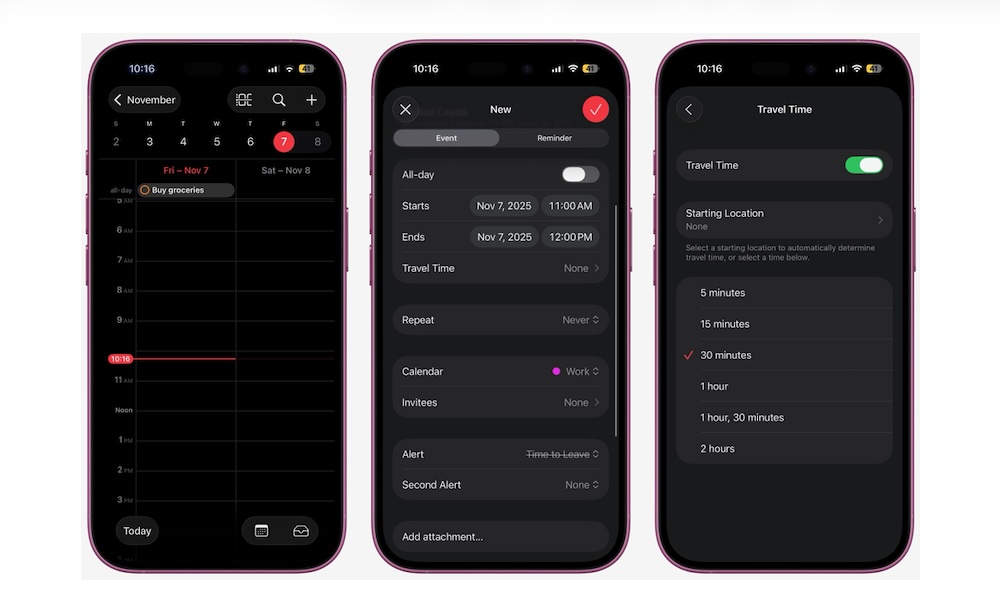
Apple’s Calendar app can give you an estimate on how long it’ll take you to get somewhere and tell you when to leave. It pulls data from Apple Maps, so it’s as accurate as it gets.
For this feature to work, you’ll need to enter the exact location of your event or appointment. Once you have that, here’s how to use it:
- Open the Calendar app.
- Tap the plus icon in the top right to create a new event.
- Enter your event’s name and location.
- Scroll down and tap on Travel Time.
- Turn on Travel Time.
- Enter your starting location.
- Now choose how you’ll travel to your destination.
- Go back and finish creating the event.
- When you’re done, tap the check mark in the top right corner of the screen.