
Let Your iPhone Transcribe Your Thoughts
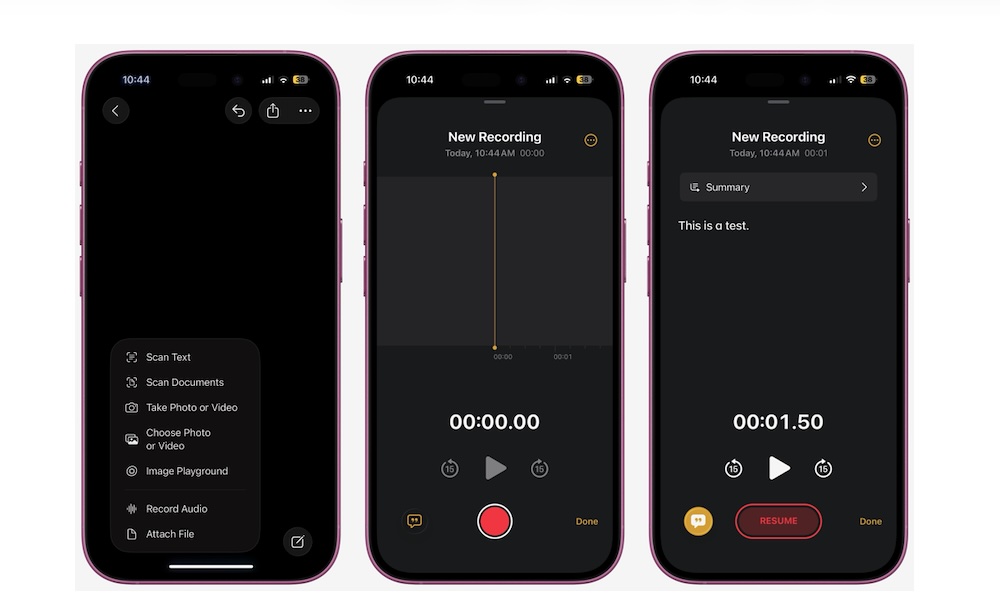
One of the best features Apple has added in the last couple of years is the ability to use transcription in apps like Notes, Voice Memos, and Journal. With the tap of a button, your iPhone will automatically start recording and create a completely accurate transcription of your words.
You can then read the transcription or use it however you want, which is perfect for long meetings or classes when you may not have been paying full attention.
This feature is available in several Apple apps, but to give you an example, here’s how to use it in the Notes app:
- Open the Notes app.
- Create a new note or go to an existing one.
- Tap the Attachments button (the little paper clip) at the bottom of your screen.
- Select Record Audio.
- Start recording your voice or anything you want.
- When you finish, tap on Done.
Now you’ll see your voice memo attached to your note. You can open it to listen to it or tap the transcription button in the bottom left corner to read it instead.