
Use Live Text so You Never Retype Again
You know when someone sends you a photo of a phone number or a slide in a meeting, and you have to retype it? Well, you don’t anymore; the iPhone can read text from photos, so you can just copy and paste it.
This is thanks to a feature called Live Text. With it, you can tap any text in an image or in the Camera app, then copy it. Likewise, if you see a phone number, you can call it instantly instead of entering it in the Phone app.
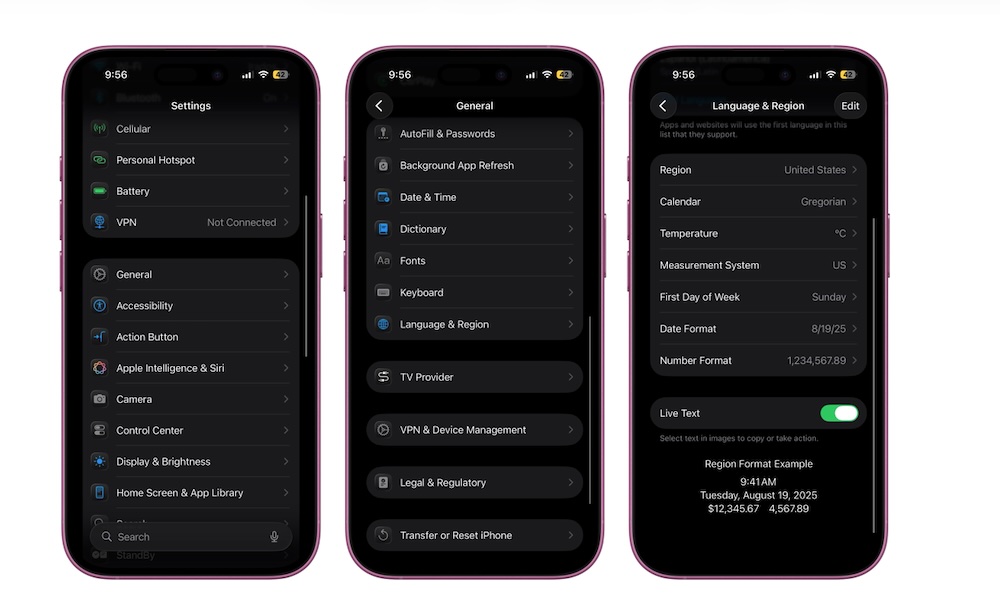
Live Text should be turned on by default, but you can enable or disable it by doing the following:
- Open the Settings app.
- Scroll down and go to General.
- Scroll down again and tap on Language & Region.
- Go down to the bottom and turn on Live Text.