
Back Tap = Secret Productivity Button
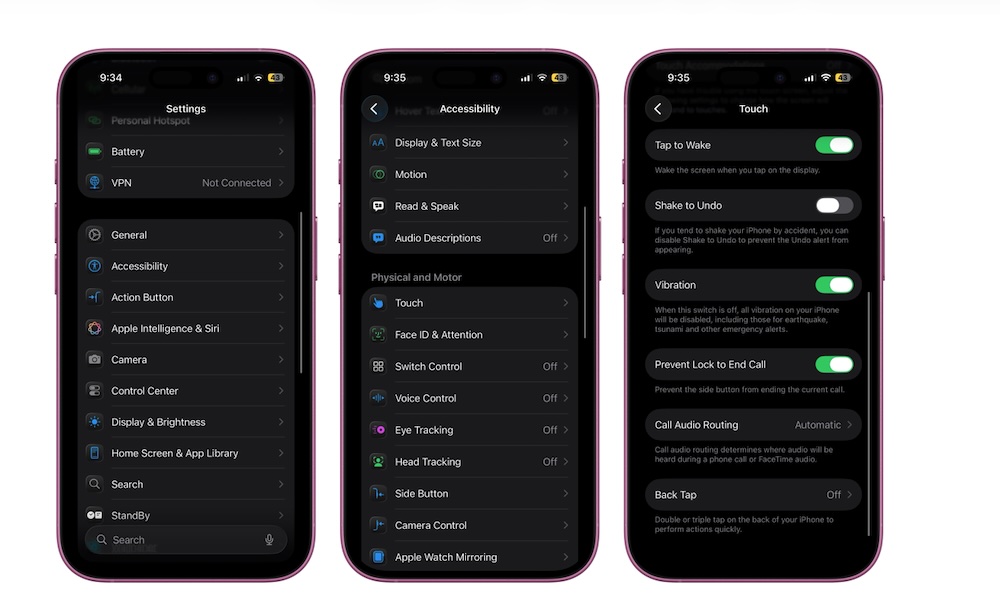
Back Tap is one of those accessibility features that most people will love once they try it — and it can make productivity a bit easier.
This feature lets you assign functions that are triggered by double-tapping or triple-tapping the back of your iPhone. For example, you could open Notes, start a timer, run a Shortcut, and more.
This basically gives you two extra buttons on your iPhone, which you can customize to do anything you need. Here’s how to set it up:
- Open the Settings app.
- Scroll down and go to Accessibility.
- Scroll down and, under Physical and Motor, tap Touch.
- Go to the bottom and tap on Back Tap.
- Tap Double Tap or Triple Tap, and then choose the action you want your iPhone to do.