
Add Quick Notes to Your Control Center
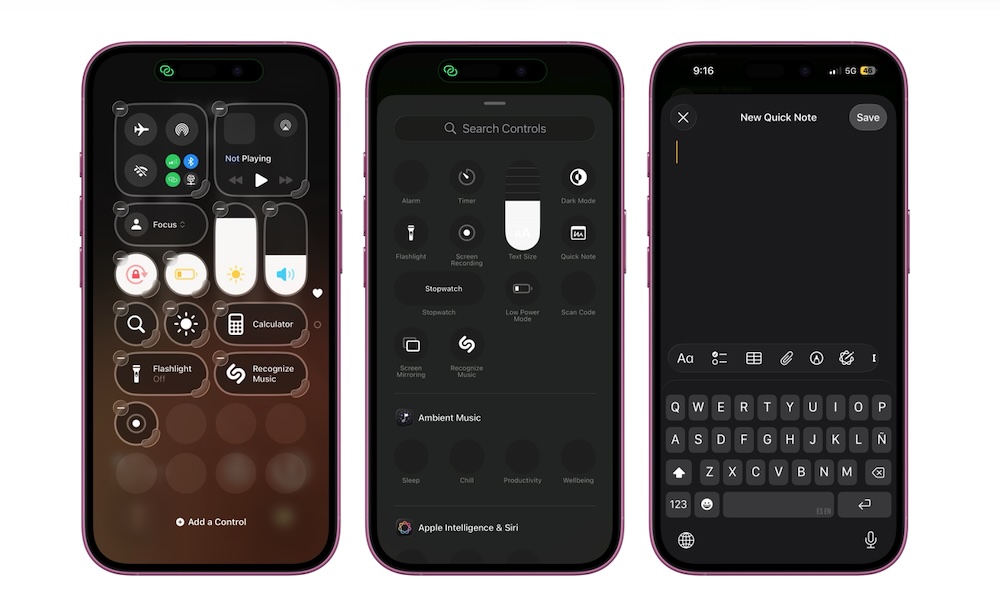
How many times have you thought of something that you know you need to remember for later, but forget to write it down? Trust us, you’re not alone. Most people don’t always have time to unlock their iPhones, swipe around, find the Notes app, and then write their note.
This means you might miss something important you needed to do, or forget your next million-dollar idea. Fortunately, Apple has a quick fix for this: Quick Notes.
You can add a Quick Note control to your Control Center that will let you open a new note and write down your thoughts from just about anywhere. These notes will be stored under a Quick Note category in the Notes app.
Quick Notes are incredibly easy to use, but you’ll need to add the button to your Control Center to get at them. Here’s how:
- Open your Control Center by swiping down from the top right corner of your screen.
- Tap the plus icon in the top left corner.
- Tap on Add a Control at the bottom of your screen.
- Tap the Quick Note control, which should be at the top of the list. If not, you can always use the search bar to find it.
And that’s it. You can now create notes almost instantly whenever you need to. When you tap the control, a new note will pop up at the top of your screen. You can write whatever you want and then hit Save to save it for later.