
Automate Your Focus Modes
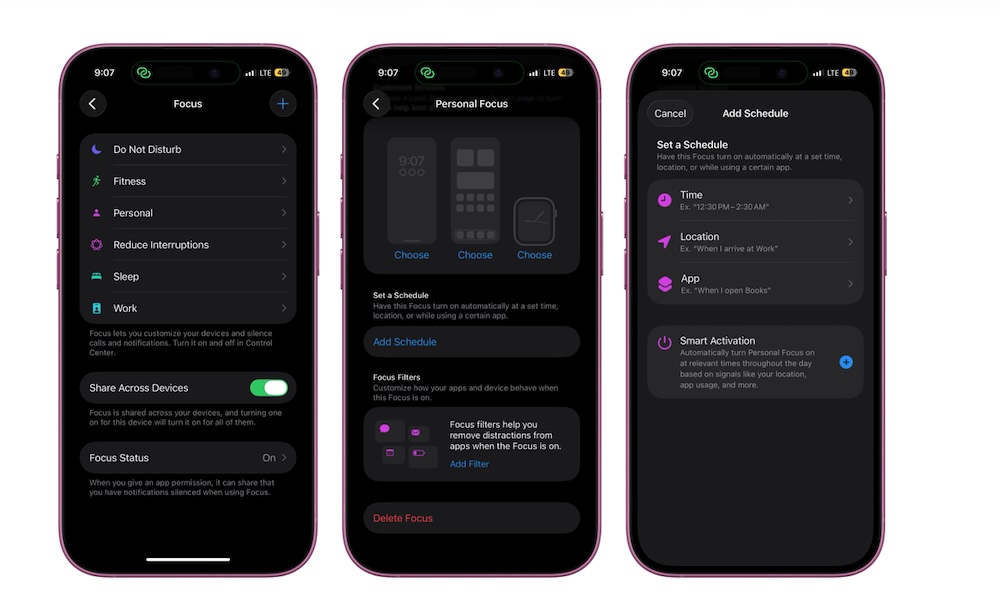
The standard Do Not Disturb feature is great if all you want is silence, but if you’re working, writing, or at the gym, you may not want to mute everything. That’s where Apple’s Focus mode comes in.
The idea is pretty straightforward: you create a “Work” or “Writing” Focus mode and tell your iPhone that only specific people and apps can interrupt you when you’re in that mode. Everyone and everything else gets temporarily ignored.
Creating a Focus mode is pretty easy: go to Settings > Focus, tap the plus icon in the top right, and follow the instructions on your screen.
However, there are a couple of tweaks you can make if you want to take your Focus modes to another level. First, you can add a schedule so your iPhone or other Apple devices turn it on automatically.
You can also add Focus filters. These let you adjust behaviors for specific apps and features whenever a Focus mode is active. For instance, you can filter your calendars so you won’t see work stuff while you’re having some personal time, or filter conversations to avoid being distracted by personal stuff while you’re working. Here’s where to find both options:
- Open the Settings app
- Scroll down and tap on Focus.
- Choose the Focus mode you want to customize.
- Scroll down, tap Add Schedule, and choose how you want your Focus mode to turn itself on. You can use a schedule by time, location, or when you open a specific app.
- Go to Add Filter and choose an available option you want to adjust.
Once you’re done, you can exit the settings app and try your new Focus mode out.