
Start Using Screen Time the Right Way
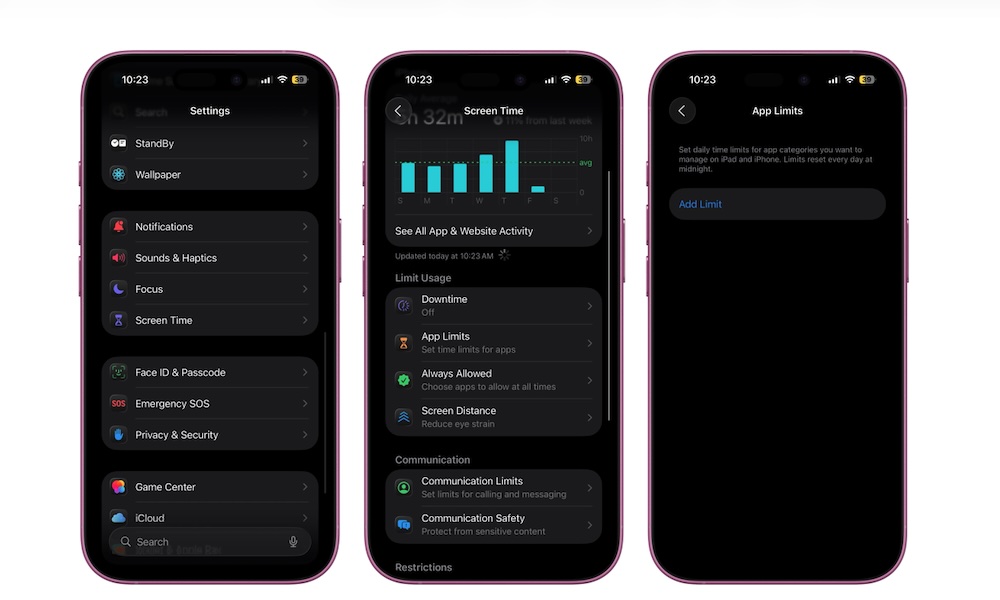
Screen Time is a great iPhone feature to find out how much time you’ve spent on your iPhone each week. While that might not seem like much, it does give you a ton of useful information to figure out which apps are wasting most of your time.
The best part about Screen Time is that you can limit the time you spend on an app each day by creating App Limits.
With these limits, your iPhone will “block” an app after a specific time you choose. Sure, you can still unlock the app and use it normally, but at least you’ll get a small nudge to get back to work if you’ve been wasting time playing games or scrolling through social media.
- Open the Settings app.
- Scroll down and go to Screen Time.
- Scroll down again and tap on App Limits.
- Tap on Add Limit.
- Choose the app or category you want to block, then tap Next.
- Choose how much time you can use this app or category during the day. You can also tap Customize Days in case you want to allow yourself to use them more during your days off.
- When you’re done, tap the check mark in the top-right corner of your screen.