
Turn On Reduce Motion
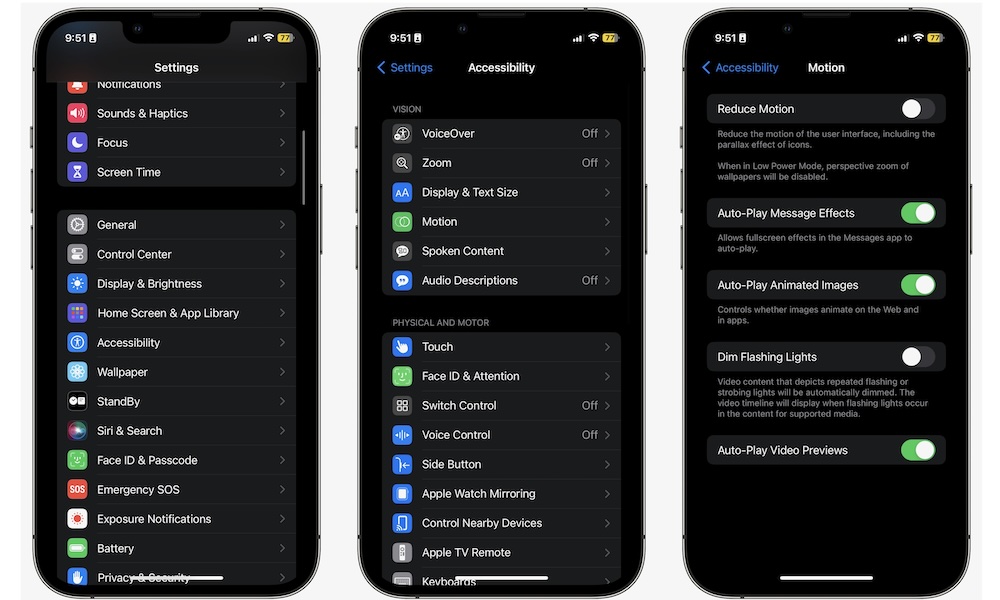
Animations are pretty, but they’re also extra work, especially for older iPhones. The Reduce Motion feature simplifies certain transitions and visual effects. For most people, this doesn’t change what the iPhone can do, but it will definitely feel different at first.
On newer iPhones, this is more of a small efficiency advantage. On older iPhones, it can make the whole phone feel snappier because the interface isn’t spending as much time animating everything.
If you try it and miss the fancy animations, you can always toggle it back. But a lot of people turn it on and forget about it because the iPhone still feels premium. Here’s where to find it:
- Open the Settings app.
- Scroll down and tap on Accessibility.
- Go to Motion.
- Turn on Reduce Motion.