
Use Low Power Mode
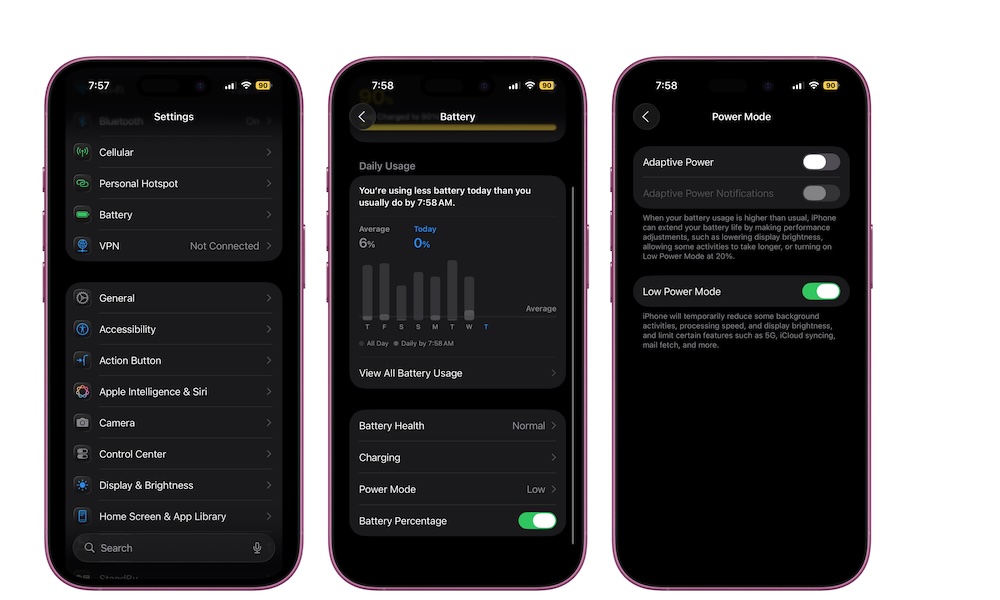
Low Power Mode is one of the best battery tools Apple gives you, but it’s meant to be used with intention. Think of it like a smart “save energy” switch for when you need extra hours, not something you keep enabled 24/7 out of fear.
The reason it works is that it targets background activity and certain processes that burn power without improving your actual day. For example, toggling on Low Power Mode will automatically disable Background App Refresh globally, stop fetching new emails in the Mail app, and stop syncing photos to iCloud. It also reduces your display brightness, sets your auto-lock to 30 seconds, and limits the refresh rate on ProMotion displays to 60 Hz.
Even so, your iPhone should still feel pretty normal for most daily tasks. Messages, browsing, music, maps, and social apps all still work mostly fine, although you might have to manually refresh or wait for new content to download when you open them. You’re just cutting down on background extras and saving a lot of battery while you’re at it.
Pro Tip: To make this really easy, the best move is to add a Low Power Mode button to Control Center so it’s just two taps away when you need it. If not, you can always go to Settings > Battery and turn on Low Power Mode.