
Turn Off Background App Refresh
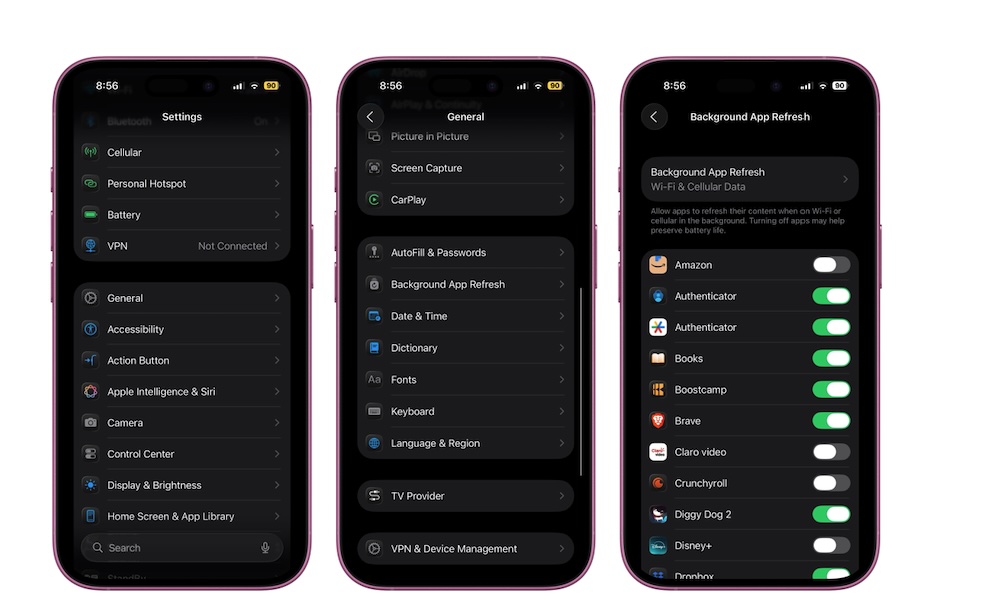
Background App Refresh sounds pretty harmless. It simply gives apps permission to wake up in the background when you’re not using them so they can update their data. That can be helpful for some apps, but it also means extra CPU work and extra network activity, which results in silent battery drain that can be multiplied if you have a lot of apps installed that want to be “helpful.”
Here’s the thing: you probably don’t need most apps to refresh in the background. Social apps will update when you open them. Shopping apps don’t need to refresh unless you’re actively using them. News apps can wait. The ones that sometimes benefit are things like navigation, audio, or apps where timely updates matter for your day. But even then, you can pick and choose. Here’s how:
- Open the Settings app on your iPhone.
- Scroll down and tap on General.
- Go to Background App Refresh.
- Go through the list and turn off any apps that really don’t need to update in the background.
You can also choose Background App Refresh from the top and select Off to disable this feature completely, but we don’t recommend this, as off really does mean “off” in this case: this will disable all apps from running in the background, even Apple’s built-in apps like Weather, Calendar, Mail, and Maps.
The good news is that disabling Background App Refresh won’t typically block notifications from email, messaging and social media services, as these come directly from the servers; they aren’t generated by these apps checking for new information in the background.