
Turn Off Unnecessary Visual Effects
The fancy animations and blur effects that Apple and many fans love can be a double-edged sword. They look great on a brand-new iPhone, but on older hardware, they can feel stuttery and slow — and that’s even more true with this year’s new Liquid Glass interface. If your iPhone hesitates when you open apps or switch between screens, it might be time to tone down these animations, no matter how much you like them.
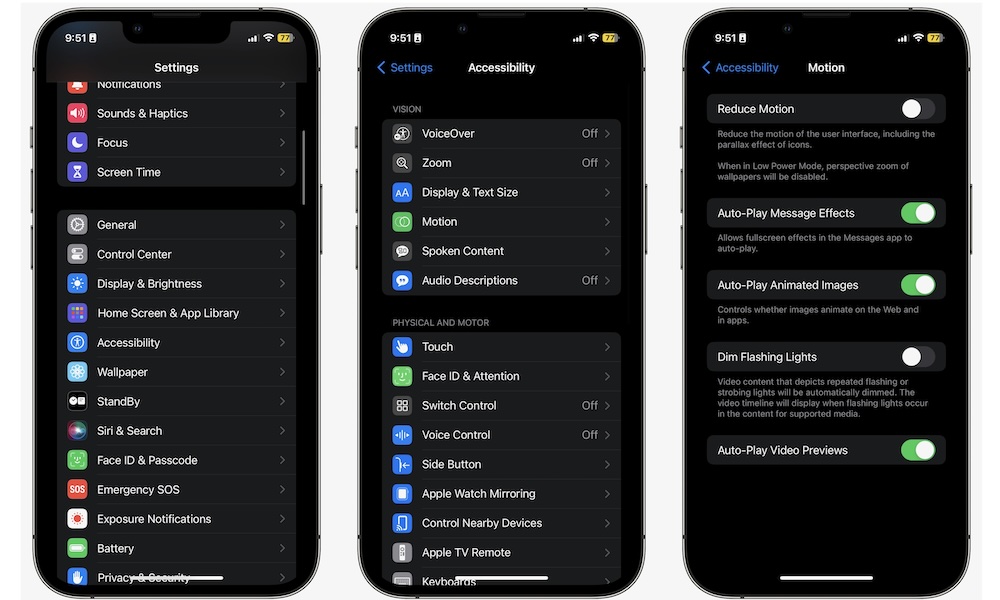
Here’s how to disable some of these animations:
- Open the Settings app.
- Scroll down and go to Accessibility.
- Under the Vision section, tap on Motion.
- Turn on Reduce Motion.
This will feel weird at first, but the longer you use it, the more you’ll get used to it. It’s a small change, but reducing the animations between transitions can help your older devices.