
Manage Location Services
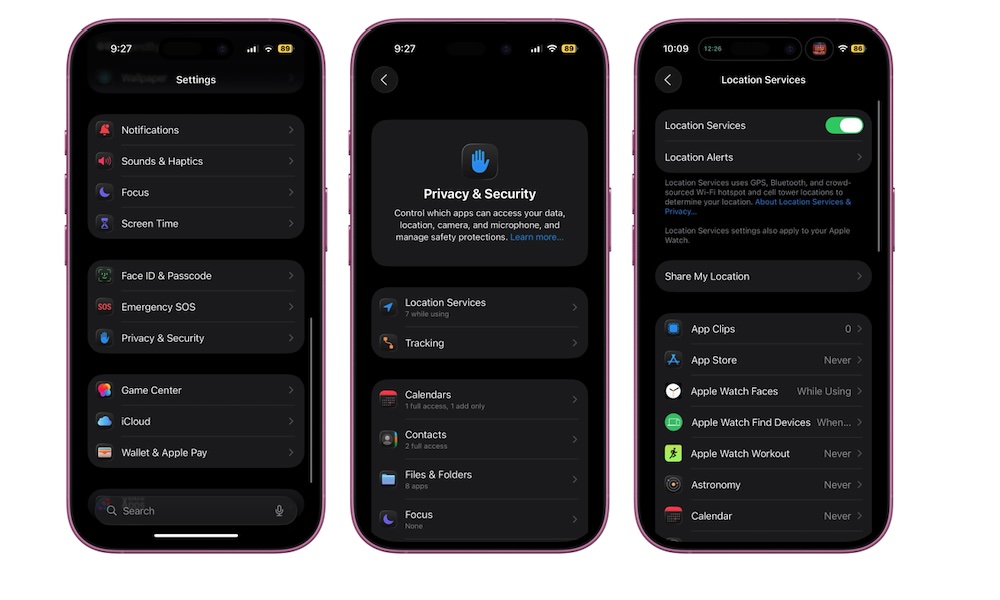
Location Services is another feature that will quietly slow down your iPhone if you aren’t careful. Some apps genuinely need constant access to your location, like Apple Maps or Uber. Others asked for it when they never really needed it again.
Letting everything track you all the time is bad for privacy, but it can also affect performance if it causes them to start up needlessly whenever your location changes. Luckily, you can manage which apps get access to your location by doing the following:
- Open the Settings app.
- Scroll down and go to Privacy & Security.
- Tap on Location Services.
- Scroll through the list of apps and tap the ones that don’t need to know your location.
- Change Always to While Using the App or Ask Next Time for anything that doesn’t need 24/7 tracking.
- Also, turn off Precise Location for apps that only need your general area (like weather apps).