
Limit Background App Refresh
A big source of slowdowns and battery drain is apps doing work when you’re not using them. Many social, shopping, and news apps love to frequently update content even when they’re not running. That adds up, especially on older devices.
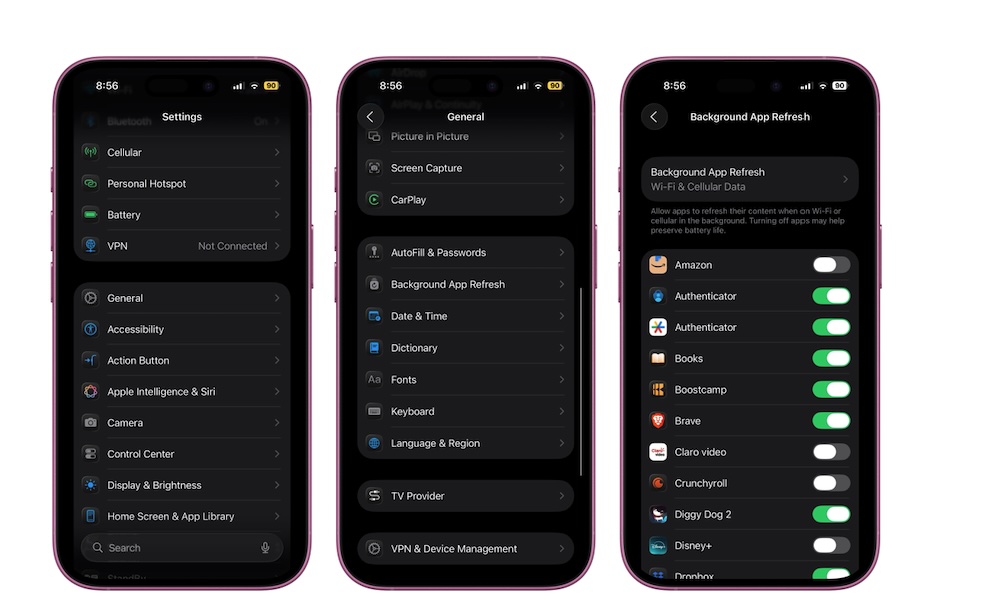
You don’t have to turn Background App Refresh off completely, but you should be picky about which apps can use it. Here’s where to find this:
- Open the Settings app.
- Scroll down and go to General.
- Tap on Background App Refresh.
- Turn off Background App Refresh on individual apps or disable it altogether, so you don’t have to worry about it.
You can keep it turned on only for the essential stuff like messaging, navigation, or health apps. However, things like shopping or social media apps don’t need to be constantly updating content for you. The fewer apps starting up and working in the background, the more responsive your iPhone will feel when you actually want to use it.