
As a Last Resort: Back Up, Erase, and Set Up Your iPhone From Scratch
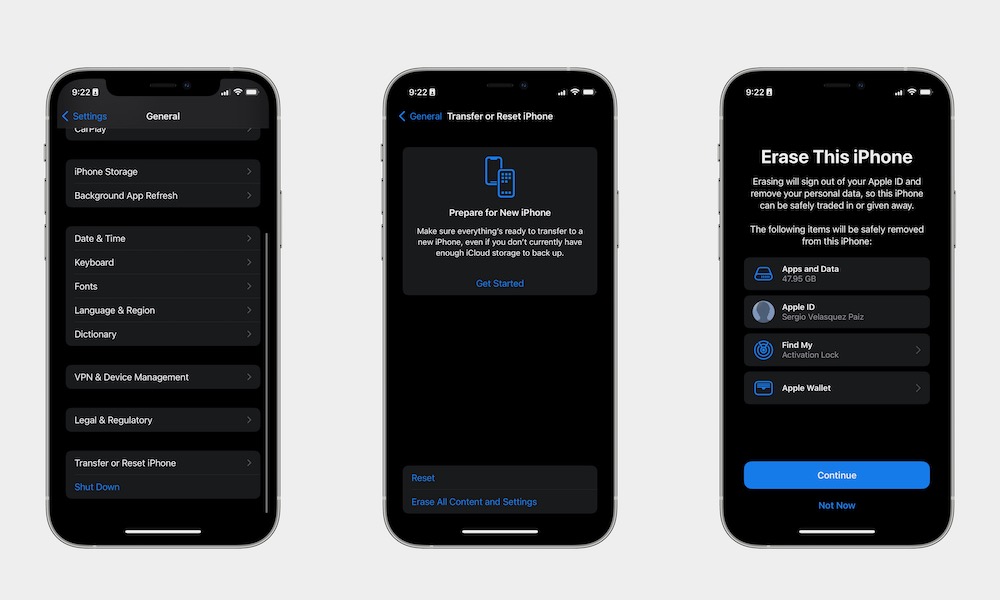
If you’ve tried everything above and your iPhone still feels unreasonably slow, a factory reset might be the only way to shake off the lag. Instead of restoring an old backup (and potentially bringing the problem back with it), you can set the device up as if it were brand new.
Of course, that doesn’t mean that you need to lose all the data your iPhone already has. We recommend that you back up your iPhone before doing this to avoid any losses. You can do this by going to Settings > Apple Account (Apple ID) > iCloud > iCloud Backup, and then tap Back Up Now.
Once you’ve done this, you can erase your iPhone:
- Open the Settings app.
- Scroll down and go to General.
- Scroll down and tap on Transfer or Reset iPhone.
- Tap on Erase All Content and Settings, and follow the instructions on your screen.
Yes, it takes time — but it also gives you a genuinely fresh software environment on hardware you already know. For some older devices, this is the closest you’ll get to that new iPhone feeling without actually buying one.