
Eye Tracking
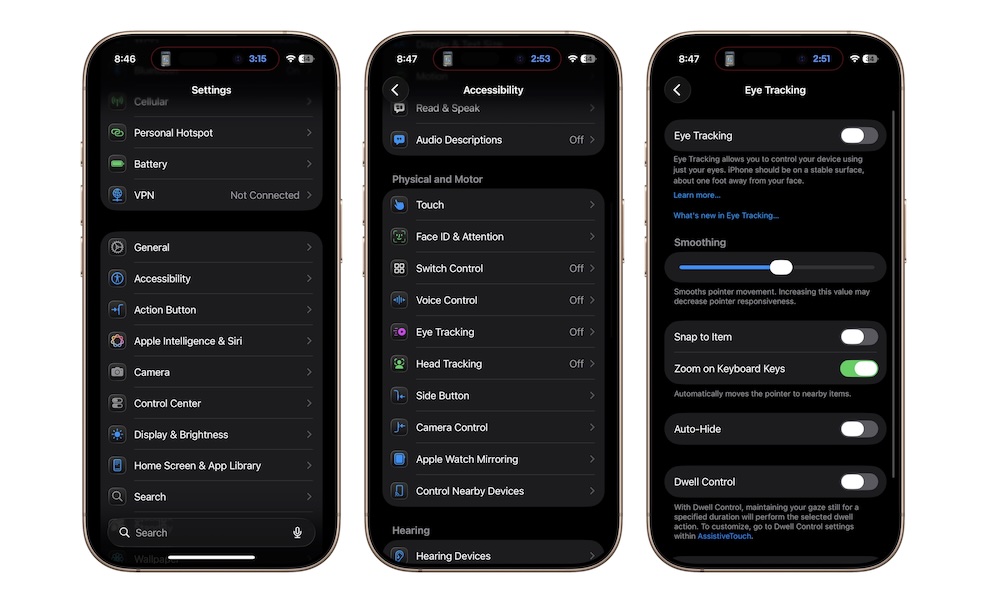
Eye Tracking is a feature that really makes you stop and think just how accessible smartphones have become. This feature basically lets you control your iPhone with nothing but your eyes, using an on-screen pointer that follows your gaze. When you look at an item and hold your gaze steady, your iPhone can treat that as a regular tap.
This is obviously a major mobility feature, but it’s also one of the clearest examples of Apple taking on-device intelligence and camera technology and applying it in a genuinely useful way. Apple says the setup and control data are processed on the device, which also matters because a feature this personal needs to feel private as well as powerful.
To start using eye tracking, simply go to Settings > Accessibility > Eye Tracking. Turn on Eye Tracking, and then follow the steps on your screen to set it up.