
Vocal Shortcuts
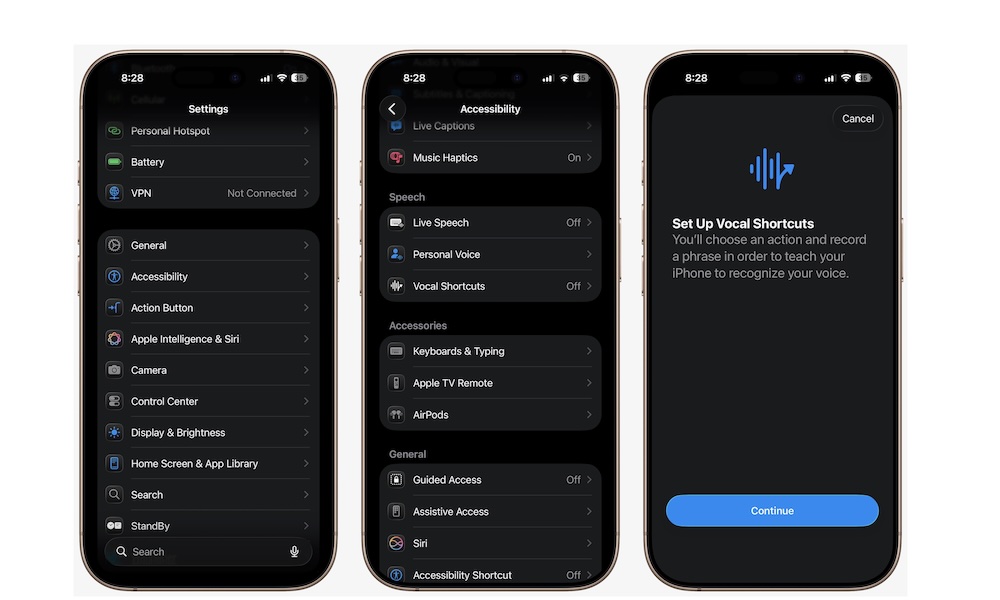
Vocal Shortcuts lets you set a custom voice command system that’s completely personal and incredibly useful. Instead of relying only on standard Siri phrasing, you can create your own spoken phrase to trigger an action on your iPhone. That might be launching a specific accessibility feature, running a particular action, or even handling a Siri request more quickly.
You can set your own phrase for something you do all the time, which makes your iPhone feel more tailored to you. It’s especially useful if you want quicker, hands-free control without memorizing formal commands or digging through different menus every time.
To create your own vocal shortcuts, head to Settings > Accessibility, scroll down to the Speech section, and tap on Vocal Shortcuts. Tap on Continue and create your own custom actions.