
Vehicle Motion Cues
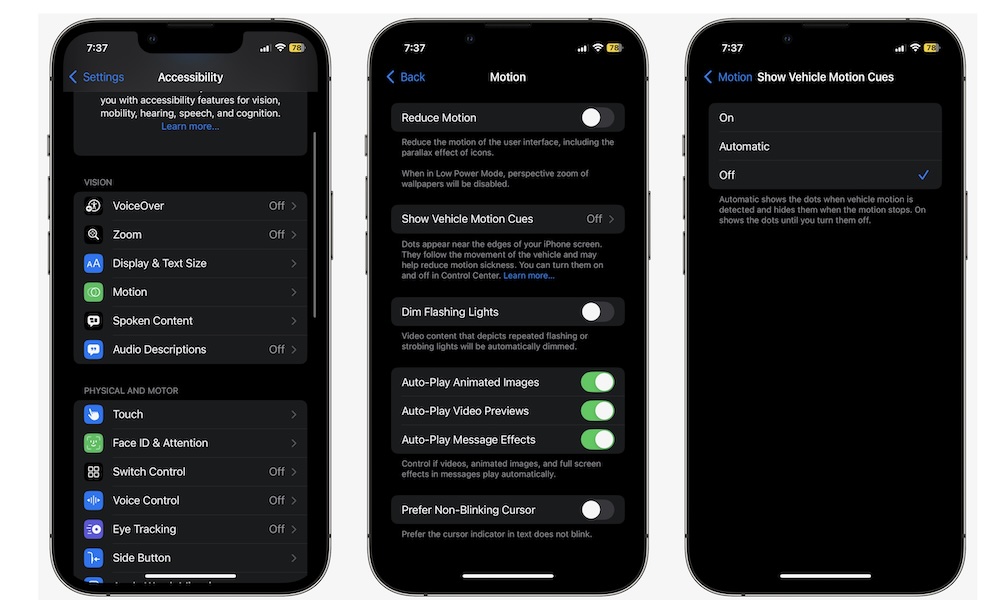
Vehicle Motion Cues might be one of the most practical hidden gems on your iPhone that Apple has added in years. When you turn it on, this feature displays animated dots on your screen that move in sync with a moving vehicle, which can help reduce motion sickness when you use your iPhone as a passenger. If you’ve ever felt nauseous scrolling social media or replying to messages in the car, this is worth trying right away.
What makes it so good is that it addresses a very real, everyday problem without forcing you to completely change how you use your phone. It’s estimated that anywhere between one-third and two-thirds of the general population can be affected by motion sickness, and if you’ve suffered it, you know how much this sucks. Granted, this feature might not work with everyone, but it’s definitely worth a shot.
To start using this feature, go to Settings > Accessibility > Motion > Vehicle Motion Cues. Turn this feature On, or choose Automatic, if you want your iPhone to detect the moving vehicle for you (which might not work all of the time).