
Music Haptics
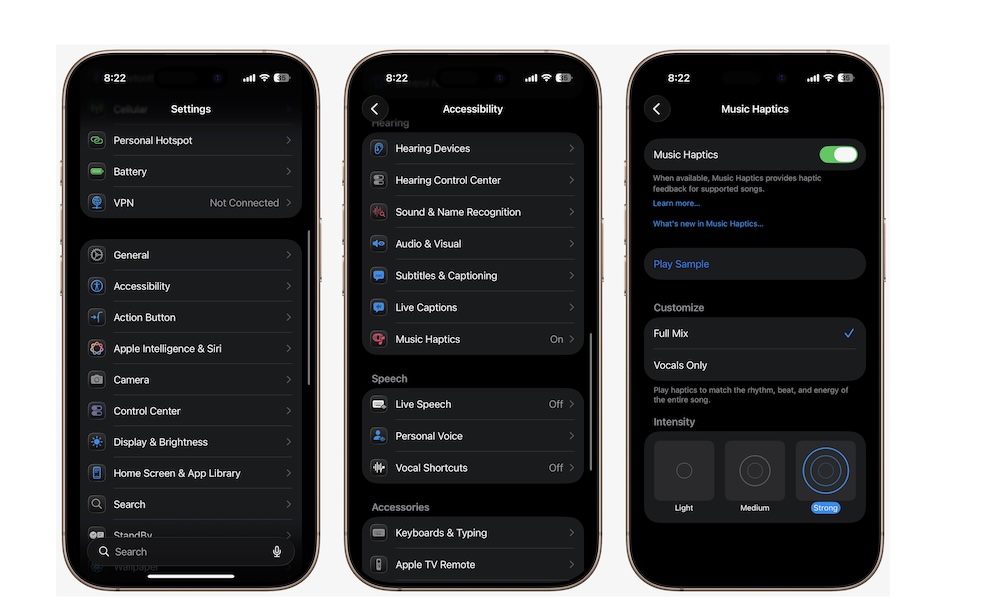
Music Haptics is one of Apple’s most creative accessibility additions, and it’s also one of the easiest to describe badly if you haven’t tried it yourself.
The basic idea is that your iPhone can translate supported songs into haptics and vibration patterns using something called the Taptic Engine. That means you’re not only hearing music, you’re also feeling it.
The accessibility purpose here is obvious, but it’s also cool to try, even if it might not be as useful as other features on the list. It can make familiar songs feel completely fresh, especially if you care about rhythm and texture. It also gives music a more immersive quality that feels surprisingly natural once you get used to it. This is the rare accessibility feature that feels useful, expressive, and just plain fun.
With all of that said, this feature isn’t for everyone. To use it, you’ll need the right app and iPhone. For the former, you can use music haptics in the Apple Music, Music Classical, and Shazam apps. As for your iPhone, you’ll need to have at least an iPhone 12 or a later model. Additionally, not every song will support this feature, but you’ll still find many of them that work.
If you have all of that covered, you can use this feature by going to Settings > Accessibility > Music Haptics. Turn Music Haptics on, and you’re good to go. Open one of the supported apps and play a supported song.