
Sound Recognition
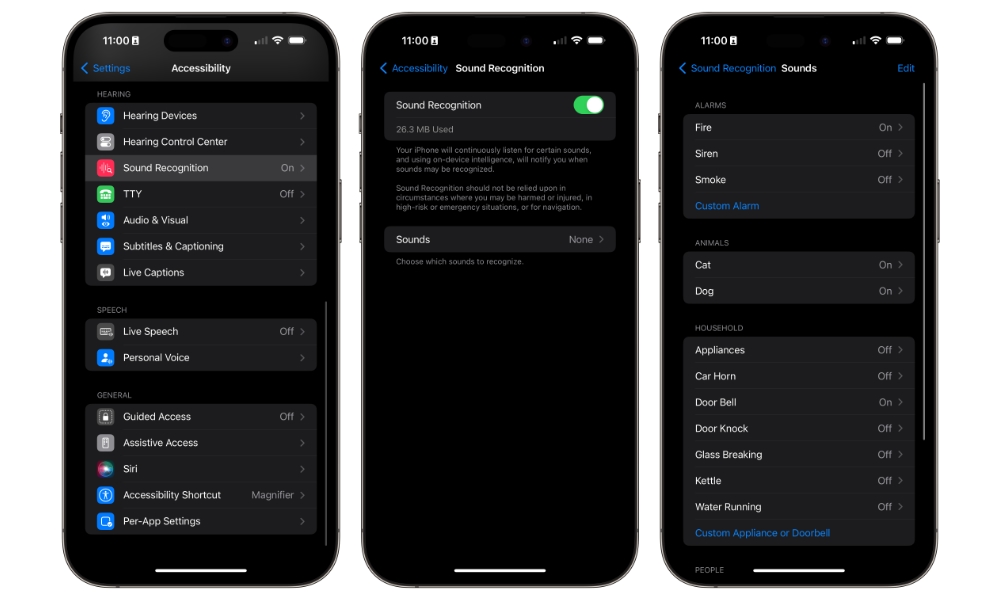
Sound Recognition is one of the most practical hidden gems in your iPhone’s Accessibility settings because it turns your device into a smart listener. It can detect sounds like a doorbell, siren, smoke alarm, baby crying, cat meowing, dog barking, and much more. Then your iPhone alerts you when it hears them. If you wear headphones often or live in a noisy house, that can be a much bigger deal than it sounds on paper (pun intended).
The most obvious use case is hearing accessibility, but you absolutely do not need hearing loss to find this feature useful. If you work with earbuds in, spend time in another room from the front door, or just don’t want to miss an important sound at home, this feature can quietly become part of your daily life. Apple has also expanded it with features like custom alarms and appliance recognition, which make it feel more flexible than many people realize.
Of course, while it’s useful, this feature isn’t perfect. Sure, it can alert you if your baby is crying, but don’t entirely rely on it, especially if you don’t have issues with your hearing. Still, if you want to try this feature for yourself, simply go to Settings > Accessibility > Sound & Name Recognition. From there, choose Sound Recognition and turn this feature on. Lastly, tap on Sounds, and turn on all the sounds you want.
Your iPhone will begin downloading these sounds because this feature works inside your device. This means you won’t have to worry about Apple listening in to your every move, as everything will be done without sending data to the company.
Pro Tip: A more focused version of Sound Recognition is also available in CarPlay that can notify you when it detects a siren, car horn, or crying baby while you’re driving.