
Not Backing Up Your iPhone Until It’s Too Late
A backup is one of those things you don’t appreciate until the day you really need it. If you drop your phone hard, have a weird update failure, or lose your device altogether, and didn’t have a backup at the ready, you can say goodbye to all your photos, files, and data.
iCloud Backup is the easiest option for most people because it’s basically automatic. The downside is that unless you’re paying for enough iCloud+ storage, you won’t be able to back up your iPhone comfortably. If you want extra peace of mind, a computer backup is a solid second layer, which you can do by plugging your iPhone into your Mac or PC and looking for the backup options in iTunes or Apple Devices for Windows, or Finder on the Mac.
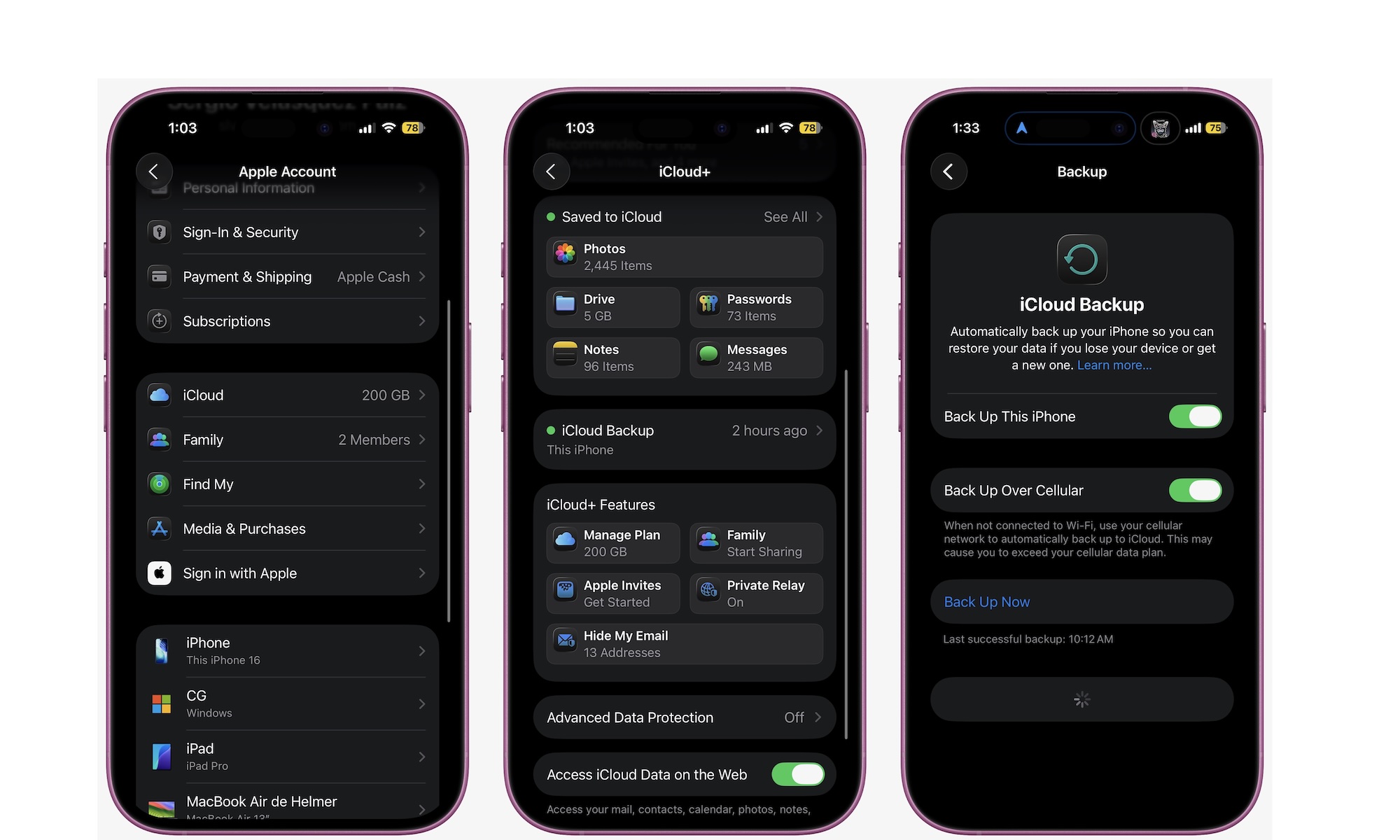
The main point is simple: don’t wait until something goes wrong. Backups are quick and easy. To back up your iPhone to the cloud, go to Settings > Apple Account > iCloud > iCloud Backup.
Turn on Back Up This iPhone, so your iPhone takes care of back-ups by itself. And if you want, you can tap Back Up Now to create a backup copy right away. Right below that button, you’ll see when your last successful backup was.
Quick Win: Check your Last Successful Backup date in Settings > [Your Name] > iCloud > iCloud Backup. If it wasn’t within the last 24 hours, tap Back Up Now while you’re on Wi-Fi tonight.