
Giving Every App Access to Your Location
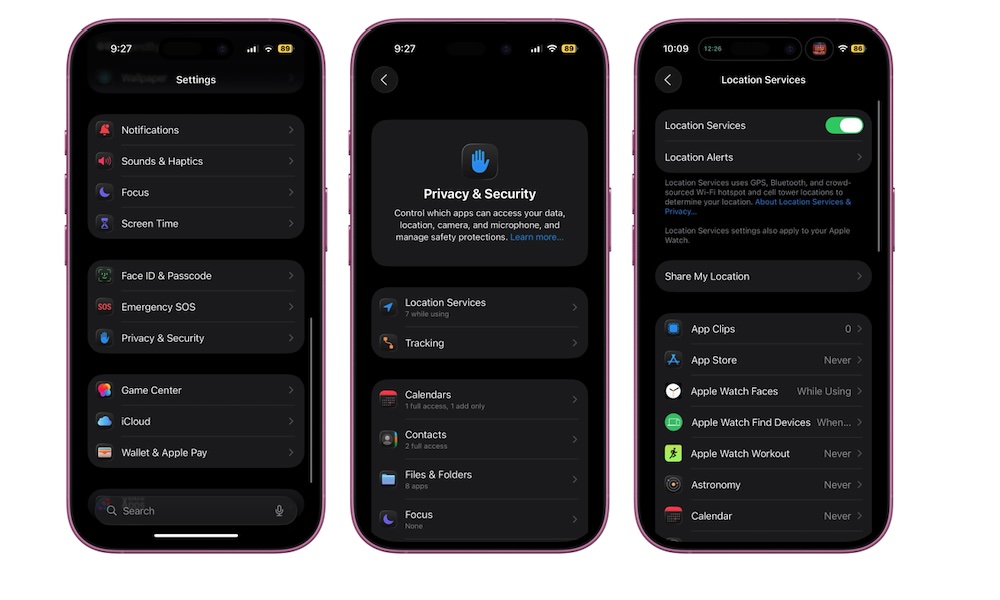
Location permissions are one of the easiest ways to accidentally share more data than you’d like, not to mention that it can also drain your battery. These days, a surprising number of apps ask for constant access to your real-time location when they don’t truly need it.
Navigation apps and safety tools make sense. But most social apps and shopping apps do not. A good rule is that if an app doesn’t need your location to function while you’re actively using it, it probably doesn’t need to know where you are at all.
Also, even if an app does need your location, it probably doesn’t need to know your precise location all the time. Many apps work perfectly fine with approximate location.
To manage which apps have access to your location, go to Settings > Privacy & Security > Location Services. Tap each app, then change most to While Using or Never. Also, turn off Precise Location for apps that don’t need exact accuracy.
Quick Win: For apps like Weather or News, turn off Precise Location in Settings > Privacy & Security > Location Services. They only need to know your city, not your front door.